一、Rest风格的操作 ElasticSearch是基于Rest风格的操作,而Rest风格是一种软件架构风格,而不是标准,它只是提供了一组设计原则和约束条件。它主要用于客户端和服务器交互类的软件。基于这个风格设计的软件可以更简洁,更有层次,更易于实现缓存等机制。
method
url地址
描述
PUT
ip:9200/索引名称/类型名称/文档id
创建文档(指定文档id)
POST
ip:9200/索引名称/类型名称
创建文档(随机文档id)
POST
ip:9200/索引名称/类型名称/文档id/_update
修改文档(过时)
POST
ip:9200/索引名称/_update/文档id
修改文档
DELETE
ip:9200/索引名称/类型名称/文档id
删除文档
GET
ip:9200/索引名称/类型名称/文档id
通过文档id查询文档
POST
ip:9200/索引名称/类型名称/_search
查询所有数据
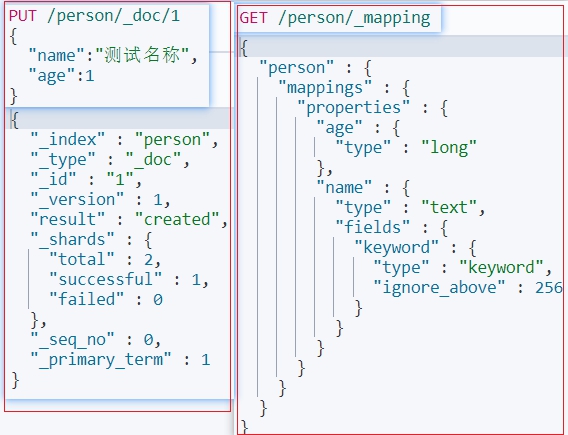
二、索引 2.1、添加索引 添加文档方式 => 自动创建索引 1 2 3 4 5 PUT /person/_doc/1 { "name" :"测试名称" , "age" :1 }
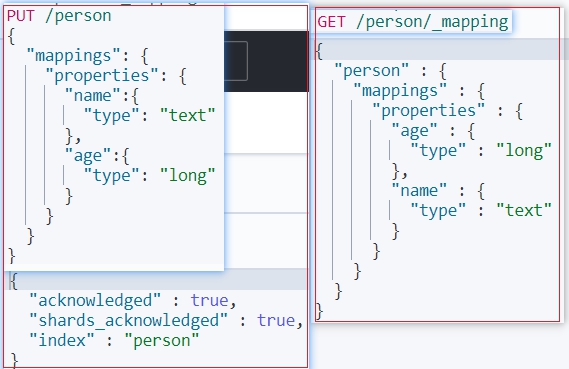
手动定Mapping => 手动创建索引 1 2 3 4 5 6 7 8 9 10 11 12 13 PUT /person { "mappings" : { "properties" : { "name" :{ "type" : "text" }, "age" :{ "type" : "long" } } } }
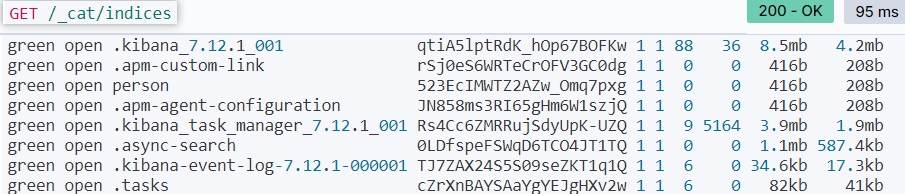
2.2、查看索引 查看所有索引 1 2 GET /_cat/indices GET /_cat/indices?v
查看单个索引的mapping结构 2.3、删除索引 三、分词器 指定分词器 1 2 3 4 5 6 7 8 9 10 11 12 13 14 15 16 17 18 19 20 #创建索引mapping指定分词器 PUT /person { "mappings" : { "properties" : { "name" :{ "analyzer" : "ik_max_word" , "search_analyzer" :"ik_max_word" , "type" : "text" }, "age" :{ "type" : "long" }, "des" :{ "analyzer" : "ik_max_word" , "type" : "text" } } } }
指定内容分词 1 2 3 4 5 GET /_analyze { "analyzer" : "ik_max_word" , "text" : ["测试描述" ] }
四、文档 4.1、创建文档 单文档创建 1 2 3 4 5 6 7 8 9 10 11 12 13 14 15 16 17 18 19 20 21 22 23 24 25 26 27 28 29 30 31 32 33 34 #不指定id创建,_id由es自动创建,此方式只能使用POST请求 POST /person/_doc { "name" :"测试名称2" , "age" :12 } #指定id方式创建,接受POST和PUT两种方式 POST /person/_doc/1 { "name" :"测试名称1" , "age" :1 } #创建复杂类型,查询时只有匹配到goods_list数组下任意name或price的值就会被查询出来,如需匹配数组下单个元素,需要指定该复杂类型为Nested PUT /order/_doc/1 { "order_name" : "小米10 Pro订单" , "desc" : "shouji zhong de zhandouji" , "goods_count" : 3 , "total_price" : 12699 , "goods_list" : [ { "name" : "小米10 PRO MAX 5G" , "price" : 4999 }, { "name" : "钢化膜" , "price" : 19 }, { "name" : "手机壳" , "price" : 199 } ] }
批量创建文档 1 2 3 4 5 6 7 8 #条件和数据分两行编写,不可以将{}进行换行操作;create、update、delete等条件指令可以同批次执行 #retry_on_conflict=>当出现冲突时尝试三次,三次失败后就放弃 #filter_path=items.*.error 只显示失败的,返回从操作失败的数据信息 POST /_bulk?filter_path=items.*.error {"create" :{"_index" :"person" ,"_id" :2 ,"retry_on_conflict" : "3" }} {"name" :"批量创建" ,"age" :123 } {"create" :{"_index" :"person" }} {"name" :"批量创建2" ,"age" :21 }
4.2、更新文档 单文档更新 1 2 3 4 5 6 7 8 9 10 11 12 13 14 15 16 17 18 19 20 21 22 23 24 25 #全量更新 POST与PUT都支持 #version=2&&version_type=external 通过版本更新数据,避免并发覆盖---CAS PUT /person/_doc/1?version=2&&version_type=external { "name" :"测试名称1" , "age" :1 } #局部更新 仅支持POST #旧版局部更新方式 ##! [types removal] Specifying types in document update requests is deprecated, use the endpoint /{index}/_update/{id} instead. POST /person/_doc/1/_update { "doc" : { "name" : "更新测试a" } } #新版局部更新方式 POST /person/_update/1 { "doc" : { "name" : "更新测试123" } }
批量更新 1 2 3 4 5 6 7 8 #局部更新 #retry_on_conflict=>当出现冲突时尝试三次,三次失败后就放弃 #filter_path=items.*.error 只显示失败的,返回从操作失败的数据信息 POST /_bulk?filter_path=items.*.error {"update":{"_index":"person","_id":2},"retry_on_conflict" : "3"} } {"doc" :{"name" :"批量创建2a" ,"age" :123 } {"update" :{"_index" :"person" ,"_id" :3 } } {"doc" :{"name" :"批量创建3a" ,"age" :123 }
4.3、删除文档 4.4、查询文档 Query_String 1 2 3 4 5 6 7 8 #查询所有 GET /person/_search #超时查询 默认没有timeout,如果设置了timeout,那么会执行timeout机制。 GET /person/_search?timeout=1s #带参查询 GET /person/_search?q=age:21 #分页排序 使用排序的话,相关度分数将_score = null GET /person/_search?from=0&size=2&sort=age:asc
Query_DSL 查询全部-match_all 1 2 3 4 5 6 GET /person/_search { "query" : { "match_all" : {} } }
指定条件查询-match 1 2 3 4 5 6 7 8 9 10 11 12 13 14 15 16 17 18 19 20 21 22 23 24 25 26 27 GET /person/_search { "query" : { "match" : { "name" : "批量" } } } #复杂条件查询,查询时只有匹配到goods_list数组下任意name或price的值就会被查询出来,如需匹配数组下单个元素,需要指定该复杂类型为Nested GET /order/_search { "query" : { "bool" : { "must" : [ { "match" : { "goods_list.name" : "小米" } },{ "match" : { "goods_list.price" : "19" } } ] } } }
多条件查询-multi_match 1 2 3 4 5 6 7 8 9 GET /person/_search { "query" : { "multi_match" : { "query" : "测试" , "fields" : ["name" ,"des" ] } } }
排序-sort 1 2 3 4 5 6 7 8 9 10 11 12 13 14 15 GET /person/_search { "query" : { "match" : { "name" : "测试" } }, "sort" : [ { "age" : { "order" : "desc" } } ] }
指定返回字段-_source 1 2 3 4 5 6 7 8 9 10 11 12 13 14 15 16 17 18 19 20 21 22 #查询指定字段,默认为includes GET /person/_search { "query" : { "match" : { "name" : "测试" } }, "_source" : ["name" ,"age" ] } #排除某些字段,查询剩下字段 GET /person/_search { "query" : { "match_phrase" : { "name" : "测试" } }, "_source" : { "excludes" : "age" } }
查看更多基本查询 语法请点击跳转
查看更多规则匹配 查询请点击跳转
脚本语言 点击跳转